
The Enterprise Gaps – What GA4 Misses
For mid-sized and enterprise organizations, GA4 alone cannot track several critical interactions without additional configuration:
| GA4 Default Capability | Enterprise Need | The Gap |
| Basic page views | Custom event definitions | GA4 cannot track specific button clicks (e.g., “Add to Cart,” “Download Report”) without custom setup |
| Limited form tracking | Full form analytics | Form abandonments, field-by-field errors, and partial completions are invisible |
| Standard parameters | Rich, contextual data | Transaction IDs, product SKUs, user segments, and customer loyalty status require custom parameters |
| Client-side only | Server-side options | Data loss from ad blockers (30-40% of enterprise traffic) requires Google Tag Manager server-side |
| GA4-only distribution | Multi-platform syndication | Sending the same event to GA4, Google Ads, Meta, and your CDP is not possible without GTM |
The Reality
“Google Analytics 4 GA4 gives you a powerful engine. Google Tag Manager gives you the steering wheel, pedals, and instruments you need to drive it effectively.
One without the other leaves you stranded.”
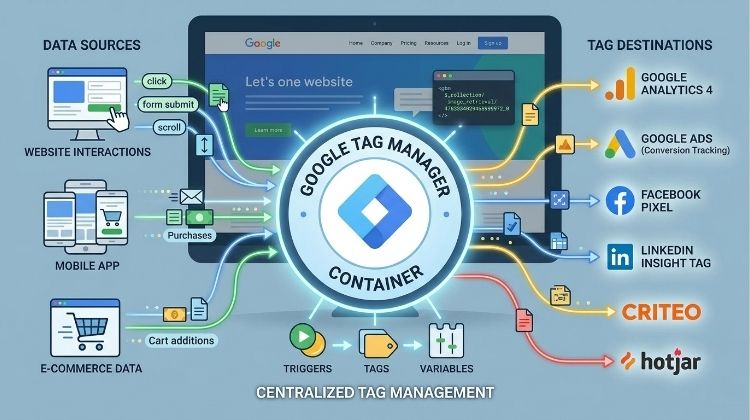
The Top 5 Reasons Your Enterprise Needs GTM with GA4
Google Tag Manager is not merely a convenience tool.
For South African mid-sized businesses and enterprises, it is an essential layer that transforms what Google Analytics 4 GA4 can deliver.
Here are five compelling reasons to integrate GTM into your analytics infrastructure.
1. Capture Data GA4 Cannot See
Google Analytics 4 automatically tracks page views, scrolls, and file downloads.
But your enterprise needs visibility into specific user interactions that GA4 ignores by default.
Google Tag Manager unlocks tracking for:
- Form abandonments (not just successful submissions).
- Specific button clicks (e.g., “Download Brochure,” “Request Quote,” “Add to Cart”).
- Scroll depth at custom thresholds (25%, 50%, 75%).
- Video play, pause, and completion events.
- Clicks on phone numbers and email links.
- Interactions with chat widgets and pop-ups.
- Outbound link clicks with destination tracking.
Enterprise Impact: Without this data, you cannot optimize conversion funnels, diagnose user hesitation, or understand what drives engagement.
2. Deploy Faster Without Developer Bottlenecks
For enterprises with complex IT approval processes, waiting weeks for a single tracking tag is not sustainable.
Google Tag Manager eliminates the “tag backlog” entirely.
Traditional GA4-only approach:
- Marketing requests a new tracking event.
- IT reviews the request (3-10 days).
- Developer adds code to the website.
- QA testing across environments (2-5 days).
- Production deployment scheduled.
- Total time: 2-4 weeks.
With Google Tag Manager:
- Marketing configures the tag in GTM (30 minutes).
- Preview and debug mode validates instantly.
- Submit for approval (optional workflow).
- Publish with one click.
- Total time: Hours or days.
Enterprise Impact: Marketing teams move at the speed of business, not the speed of IT. Campaign launches are not delayed by tracking dependencies.
3. Ensure Data Consistency Across Your Marketing Stack
Mid-sized enterprises typically use multiple analytics and advertising platforms simultaneously.
Google Tag Manager becomes a central data layer that sends the same high-quality data to every destination.
Without GTM, you manage separately:
- Google Analytics 4 GA4 tags.
- Google Ads conversion tags.
- Meta (Facebook) pixel events.
- LinkedIn Insights tag.
- TikTok pixel.
- Your CDP or data warehouse ingestion.
With Google Tag Manager:
- One set of tracking rules.
- One debugging process.
- One governance framework.
- Consistent data across all platforms.
Enterprise Impact: No more discrepancies between GA4 conversions and Google Ads conversions.
No more manual reconciliation across platforms.
4. Implement Advanced Ecommerce Tracking
For enterprises selling products online, GA4 default ecommerce tracking is basic.
Google Tag Manager enables enhanced e-commerce measurement.
What GTM adds to your e-commerce tracking:
- Product impressions on listing pages.
- Product clicks with name and position.
- Add-to-cart and remove-from-cart with product details.
- Checkout step tracking (step 1, step 2, step 3).
- Payment and shipping information capture.
- Transaction data with tax, shipping, and coupon codes.
Enterprise Impact: True understanding of product performance, checkout friction points, and revenue attribution by product category.

5. Enable Server-Side Tracking for Data Recovery
By enabling GTM server-side tracking, you are able to recover 30-40% of enterprise data lost due to ad blockers and browser privacy features like Safari’s Intelligent Tracking Prevention.
Google Tag Manager server-side containers recover most of this lost data by:
- Bypassing ad blockers entirely (server-to-server data flow).
- Extending cookie lifetimes to up to two years.
- Preserving UTM parameters across the full customer journey.
- Enabling first-party cookie status on your own domain.
Enterprise Impact: Accurate attribution for long sales cycles, recovered ad spend value, and durable first-party data assets for a cookieless world.
GTM’s The Data Layer – Your Secret Weapon
Many enterprises assume that implementing Google Tag Manager simply means swapping hardcoded tags for GTM tags.
But GTM brings something far more valuable: a built-in data layer that can be enhanced to capture rich, contextual information about your users.
What Is the GTM Data Layer?
When you install Google Tag Manager, you gain access to a JavaScript object called the dataLayer.
This is a core feature of GTM that acts as a temporary storage space for information about user interactions on your website.
How it works with GA4:
- Your website pushes events and variables into the GTM data layer.
- Google Tag Manager reads this structured information.
- GTM then sends rich, complete data to Google Analytics 4.
E.g: Your website pushes complete product details into the GTM data layer, GTM reads the structured data, GA4 receives a rich purchase event with:
- Transaction ID: TX-12345
- Products: [“Laptop Pro”, “Wireless Mouse”]
- Revenue: R12,499.00
- Customer segment: First-time buyer
Enterprise Impact of GTM Enhanced Data Layer:
- Accurate revenue attribution by marketing channel and campaign.
- Product performance analysis by SKU, category, and price point.
- Customer segment tracking (new vs. returning, loyalty tier).
- Funnel abandonment diagnosis by specific product or step.
Google Tag Manager vs. Hardcoded GA4
For enterprises deciding between hardcoded Google Analytics 4 GA4 tags and Google Tag Manager, the differences are substantial.
GTM is not merely a convenience layer—it fundamentally changes how your organization manages data.
| Factor | Hardcoded GA4 (No GTM) | GA4 + Google Tag Manager |
| Setup speed | Slow (developer required for every change) | Fast (marketing can deploy tags independently) |
| Flexibility | Limited to GA4 default events | Unlimited custom events and parameters |
| Data quality | Dependent on scattered developer implementation | Centralized, governed, and auditable |
| Multi-platform support | GA4 only | GA4 + Google Ads + Meta + LinkedIn + CDP |
| Error handling | Difficult to debug (tags buried in code) | Centralized preview and debug mode |
| Version control | Relies on development repositories | Built-in version history and one-click rollback |
| Server-side tracking | Not possible | Full server-side container support |
| Enterprise governance | Limited (anyone with code access can change tracking) | Role-based approvals and publishing workflows |
The Verdict
“For South African mid-sized businesses and enterprises, Google Tag Manager is not optional. It is the minimum viable infrastructure for serious analytics using Google Analytics 4 GA4. Hardcoded tags belong in the past.”.

Common Enterprise Concerns About GTM
Enterprise decision-makers often hesitate to adopt Google Tag Manager.
Let us address the most frequent concerns directly.
“We Don’t Have Developer Resources”
That is exactly why you need Google Tag Manager.
GTM reduces developer dependency significantly.
Marketing teams can implement 80% of tracking requests without touching code.
The remaining 20% (enhancing the data layer) requires development, but only once per event type.
“Is GTM Secure for Enterprise Use?”
Yes. Google Tag Manager includes enterprise-grade security features:
- Role-based user permissions (View, Edit, Approve, Publish).
- Container change history and audit logs.
- Approval workflows requiring multiple sign-offs.
- Environment-specific containers (development, staging, production).
“Will GTM Slow Down Our Website?”
A properly configured Google Tag Manager container has minimal performance impact.
GTM tags fire asynchronously, meaning they do not block page rendering.
In fact, using GTM often improves performance compared to hardcoded GA4 tags scattered across your codebase.
“We Already Have GA4. Why Change?”
You do not need to change anything.
Google Tag Manager works alongside your existing Google Analytics 4 implementation.
Add GTM incrementally. Start with one tag. Prove value. Expand. Your hardcoded GA4 tags can remain while you migrate gradually.
A Practical Roadmap for Adding GTM to Your GA4 Setup
Migrating from hardcoded GA4 to a Google Tag Manager powered implementation does not require a “big bang” launch.
A phased approach reduces risk and delivers value incrementally.
Phase 1: Assessment (1-2 Weeks)
Before touching any code, understand your current state.
- Audit your existing Google Analytics 4 GA4 implementation.
- Identify data gaps (what do you wish you could track but cannot?).
- Document all active tracking requests from marketing, product, and analytics teams.
- Inventory existing hardcoded tags on your website.
Phase 2: GTM Setup (1-2 Weeks)
Establish the foundational infrastructure.
- Create a Google Tag Manager account and container.
- Install the GTM container snippet on your website (alongside existing GA4 tags).
- Set up user permissions and approval workflows.
- Configure your GA4 configuration tag in GTM.
Phase 3: Migrate Existing GA4 Tags (2-4 Weeks)
Gradually replace hardcoded tags with GTM-managed tags.
- Remove hardcoded Google Analytics 4 GA4 tracking from your website page by page.
- Recreate all existing events in Google Tag Manager.
- Validate using preview and debug mode before publishing.
- Publish and monitor for discrepancies.

Phase 4: Extend Your Tracking (Ongoing)
Now the real power of Google Tag Manager becomes visible.
- Implement enhanced ecommerce tracking via the data layer.
- Add third-party tags (Google Ads, Meta, LinkedIn).
- Set up custom events and parameters that GA4 cannot track alone.
- Explore server-side tracking for data recovery.
Phase 5: Governance and Training (Ongoing)
Ensure long-term success with enterprise processes.
- Document your tagging standards and data layer schema.
- Train marketing teams on Google Tag Manager basics.
- Establish change request and approval processes.
- Schedule regular container audits.
With this roadmap, your enterprise transitions from hardcoded Google Analytics 4 to a flexible, governed Google Tag Manager implementation without business disruption.